# ¿Cómo ver mi página web sin dominio?

1. Para poder ver tu sitio web sin tener un dominio apuntando al mismo, debés editar el archivo **hosts** ubicado en:  `C:/Windows/System32/drivers/etc`
2. En ese archivo agregá esta linea al final:

```
IPdetuservidor tudominio.com.ar www.tudominio.com.ar
```

**Ejemplo:**

```
66.55.125.22 midominioejemplo.com www.midominioejemplo.com
```

* El número IP es el del servidor donde esté tu cuenta de hosting.
* El dominio que elijas puede ser cualquiera para uso temporal.
* Tené en cuenta que debés editar este archivo con el Notepad abriéndolo con permisos de administrador, como se muestra a continuación:
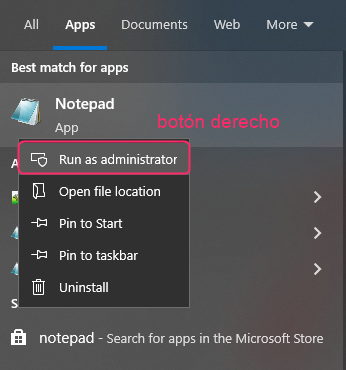
<div align="left"><figure><img src="/files/utxGo1UzwwYlpBnHM7Lo" alt=""><figcaption></figcaption></figure></div>

3. Luego reiniciá tu PC.
4. Eso es todo. Ahora, podrás probar tu sitio web usando tu dominio de pruebas. Cuando ya tengas tu dominio real apuntando a tu cuenta de hosting podrás borrar las lineas agregadas al archivo **hosts**.


---

# Agent Instructions: Querying This Documentation

If you need additional information that is not directly available in this page, you can query the documentation dynamically by asking a question.

Perform an HTTP GET request on the current page URL with the `ask` query parameter:

```
GET https://ayuda.sitioshispanos.com/menu-principal/guias/web-hosting/soluciones-a-problemas-de-hosting/como-ver-mi-pagina-web-sin-dominio.md?ask=<question>
```

The question should be specific, self-contained, and written in natural language.
The response will contain a direct answer to the question and relevant excerpts and sources from the documentation.

Use this mechanism when the answer is not explicitly present in the current page, you need clarification or additional context, or you want to retrieve related documentation sections.
